
PhotoCraft vs GIMP (2026): Which Should You Use?
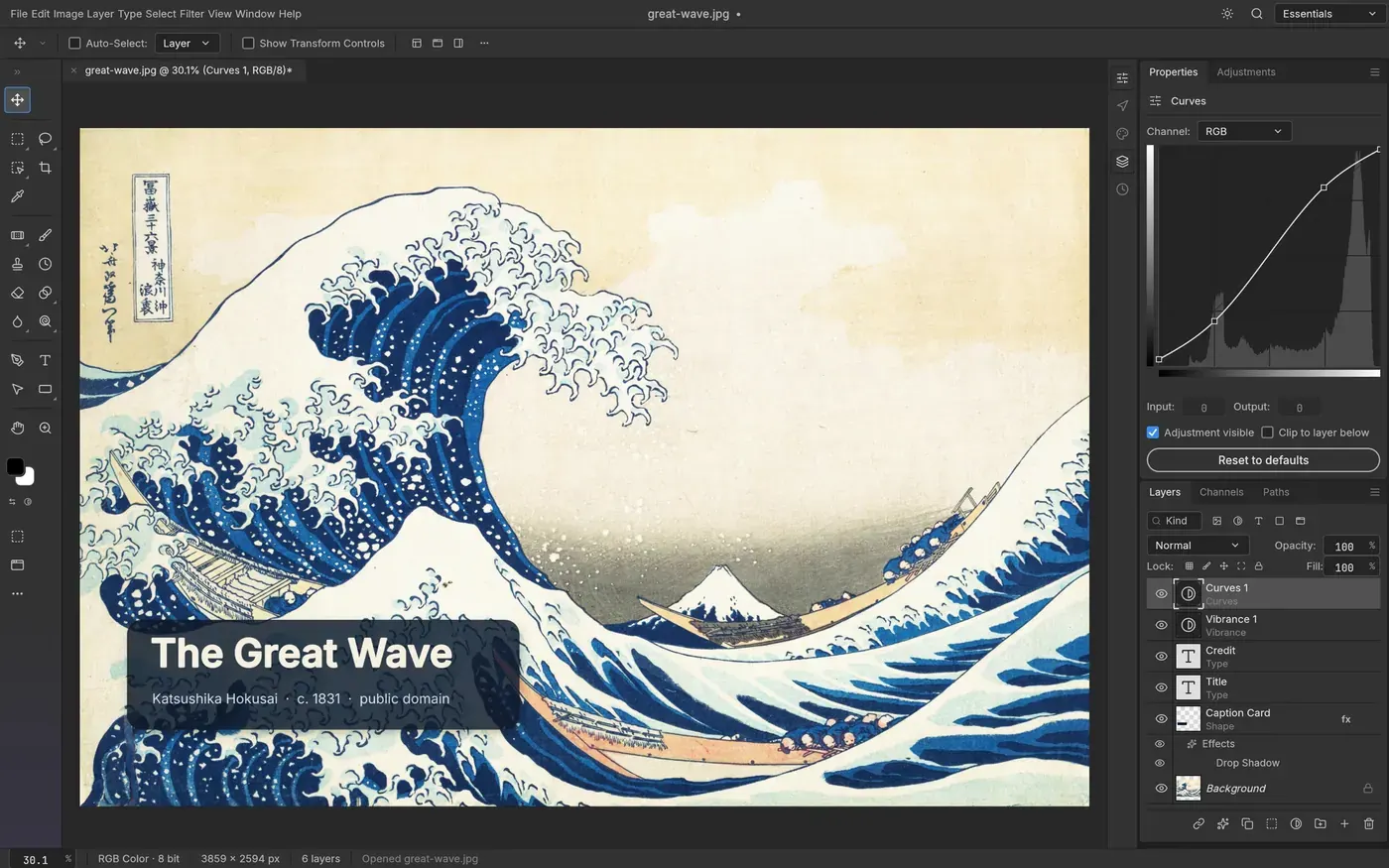
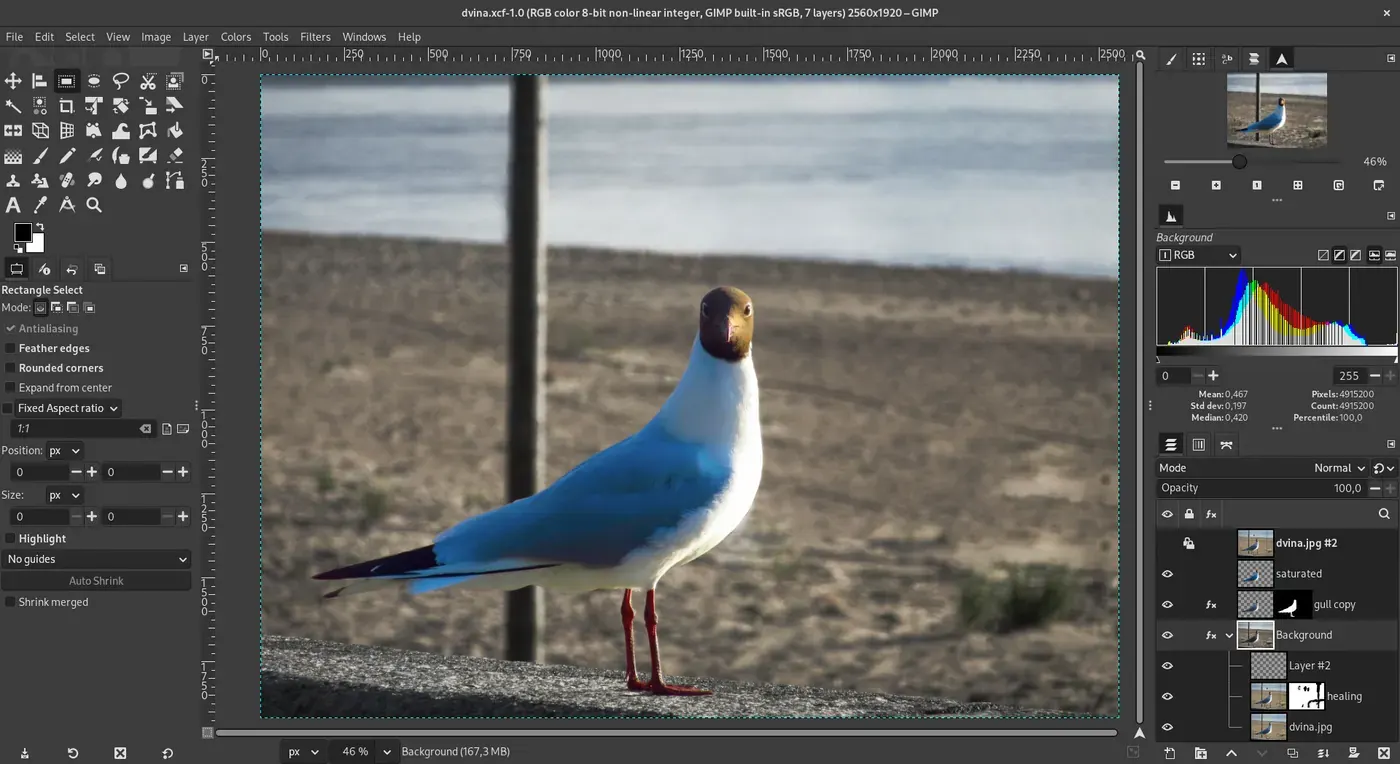
Compare PhotoCraft and GIMP.
| Dimension | PhotoCraft | GIMP | Source |
|---|---|---|---|
| License | MIT OR Apache-2.0 (LICENSE-MIT + LICENSE-APACHE, 2026-10-22) | GPL-3.0-or-later (seed listing / GNOME GitLab) | Official repositories |
| Price | free (open-source) | free (open-source) | Licenses above |
| Current release (this check) | v0.12.0 (GitHub, 2026-10-21T18:28:57Z) | GIMP 3.2.6 is the current stable download on gimp.org (notes date 2026-09-10) | GitHub Releases; gimp.org/downloads (2026-10-22) |
| Platforms | macOS, Windows, Linux, FreeBSD x86_64, Web. v0.12.0 dropped FreeBSD aarch64 | Windows 10 1903+, macOS 11+, Linux AppImage/Flatpak/Snap; 32-bit binaries ended in 3.2 | PhotoCraft v0.12.0 notes; gimp.org/downloads; GIMP 3.2 notes |
| Maturity | early alpha — README says it is not yet a daily professional Photoshop replacement | Long-standing GNU image editor; 3.2.6 after the 3.2 line | PhotoCraft README IMPORTANT note; gimp.org/downloads |
| Implementation | Pure Rust, wgpu GPU compositor + CPU reference, egui UI, WASM web build | C / GTK / GEGL (GNOME GitLab; GitHub GNOME/gimp mirror language C) | PhotoCraft README; GitHub GNOME/gimp |
| Community activity (sourced snapshot) | 70,680 stars, 12,462 forks, created 2026-09-30, last push 2026-10-22 | 6,540 stars on the GitHub mirror, last push 2026-10-22 | GitHub API storytold/photocraft; GitHub GNOME/gimp mirror (2026-10-22) |
| Native / interchange formats | Native .pcraft; README claims PSD/PSB read-write, XCF read, .kra read, OpenRaster, SVG | Native XCF (only format that stores everything except undo); other formats via Export | PhotoCraft README Formats; GIMP 3.0 User Manual ch. 6 |
| Documented editing model | README claims 67 tools, layers, masks, 16 adjustment layers, layer styles, type, vectors | 3.2 notes add link layers, vector layers, non-destructive filters, MyPaint v2 brushes | PhotoCraft README; gimp.org/release-notes/gimp-3.2.html |
| AI / generative fill | README lists AI/generative features among the biggest gaps | Not a generative-image product; GEGL filters and plugins, not a Midjourney-class model | PhotoCraft README; GIMP about/features pages |
| Plugins | README lists plug-in compatibility among the biggest gaps | Long-standing plug-in and script ecosystem (project history; not counted here) | PhotoCraft README; GIMP about page |
| Upstream scorecard (self-reported) | v0.12.0 notes quote tools 36/8/0 done/partial/missing; 24 of 171 settings do nothing | n/a | PhotoCraft GitHub release v0.12.0 |
| Hardware / install | Desktop installers or `cargo run --release`; wgpu on Metal/Vulkan/DX12/WebGPU; no VRAM SKU published | Native desktop app; 3.2 dropped 32-bit binaries; AppImage notes Debian 13+ | PhotoCraft README Downloads; GIMP 3.2 notes; gimp.org/downloads |
| Performance / quality | Not independently tested | Not independently tested | n/a |
When to choose which
- Production photo editing today: GIMP — Maturity plus the 3.2 non-destructive-layer work. We did not test a production job.
- Opening a layered PSD with a new Rust-native app: PhotoCraft — README claims PSD open/edit/save and a 307/309 psd-tools render check. Early alpha; we did not reproduce that corpus.
- Plugin-heavy or GEGL/MyPaint workflows: GIMP — PhotoCraft lists plug-in compatibility as a gap. GIMP 3.2 documents MyPaint v2 and GEGL Vibrance.
- Web-targeted or agent/MCP-driven editor: PhotoCraft — README lists a WASM build and CLI / JSON / MCP control. Untested here.
- Tracking a new Rust-native editor: PhotoCraft — v0.12.0, 70,680 stars on 2026-10-22. Star velocity is not quality.
- A GIMP alternative with AI generative fill: Neither as a drop-in — PhotoCraft README says generative features are a gap. For local generation see Midjourney-class alternatives (ComfyUI, Fooocus).
- Replacing Photoshop this week with a free editor: GIMP — See GIMP vs Photoshop and Switch from Photoshop to GIMP. PhotoCraft is still early alpha.
Read the entity pages: PhotoCraft and GIMP. Both hang off Photoshop alternatives. Direct commercial comparisons: PhotoCraft vs Photoshop, GIMP vs Photoshop. Same cluster: Krita, Krita vs GIMP, Krita vs Photoshop, PhotoCraft vs Krita. Install: How to install PhotoCraft, How to install GIMP 3.2, Switch from Photoshop to GIMP.
PhotoCraft vs GIMP at a glance
PhotoCraft is a new pure-Rust editor (created 2026-09-30) that calls itself a clean-room Photoshop-class app. The 2026-10-22 GitHub check: 70,680 stars, 12,462 forks, latest release v0.12.0 (2026-10-21), dual MIT OR Apache-2.0. The README still says early alpha and “not yet a Photoshop replacement for daily professional work.”
GIMP is the long-standing GNU Image Manipulation Program. gimp.org/downloads presented GIMP 3.2.6 as the current stable build on 2026-10-22 (release notes date 2026-09-10). The GitHub GNOME/gimp mirror showed 6,540 stars the same day. License in our seed: GPL-3.0-or-later. Canonical code: gitlab.gnome.org/GNOME/gimp.
Stars are not quality. PhotoCraft’s star velocity is a discovery signal, not a bake-off.
Features people actually search for
Copied from official docs. Not independently tested on a forkalt machine.
| Job | PhotoCraft (README / v0.12.0, 2026-10-22) | GIMP 3.2.6 (release notes / 3.0 manual / downloads, 2026-10-22) |
|---|---|---|
| Layers | Layers, masks, layer styles (Drop Shadow, Glow, Bevel, Stroke, overlays); smart objects | Pixel layers plus non-destructive text, link, and vector layers (3.2) |
| Adjustments / filters | 16 adjustment layers (Curves, Levels, Vibrance, …); live filter dialogs | Non-destructive GEGL filters; 3.2 adds filters on channels and a GEGL Vibrance op; pass-through groups can stack filters |
| Type | Point/paragraph type, Character/Paragraph controls, PSD round-trip (claimed) | Long-standing text layers; 3.2 improves the on-canvas editor and outline directions |
| Vectors | Shape layers + Pen tools; README claims 116/116 shape-layer pixel match vs Photoshop | Vector layers from the Path tool (3.2), stroke/fill, non-destructive transform |
| PSD / interchange | Open, edit, save layered PSD/PSB; 307/309 psd-tools render claim | XCF native; other formats via Export — import quality of PSD not retested here |
| Also reads | GIMP XCF (read), Krita .kra (read), OpenRaster, SVG, Affinity (read-only) | Wide plug-in format list; only XCF stores everything except undo |
| Brushes | Brush engine listed (Shape Dynamics, Scattering, …); depth listed as a gap vs Photoshop | Own brush engine + MyPaint Brush v2 (20 new brushes in 3.2) |
| Plugins | Plug-in compatibility listed as a gap | Scripts and plug-ins are part of the long-standing project |
| Generative AI | Listed as a gap | Not a hosted image model. For local generation see Midjourney alternatives |
| Agents / automation | CLI, JSON control channel, MCP (README) | Script-fu / Python plug-ins (not re-documented in this pass) |
| Web build | WASM zip on GitHub Releases (photocraft-web-0.12.0.zip) |
No official GIMP-in-the-browser product in our sourced set |
| Upstream scorecard | v0.12.0: tools 36 done / 8 partial / 0 missing; 24 of 171 settings do nothing | n/a |
PhotoCraft’s own README says every Photoshop menu item is wired to a command, and that this measures wiring, not behaviour. Treat the left column as identification, not a promise that a production retouch will survive.
When to pick each
- Need a production-proven free editor this week: GIMP 3.2.6 from gimp.org/downloads. Migration notes: Switch from Photoshop to GIMP.
- Need the commercial Creative Cloud editor: GIMP vs Photoshop, PhotoCraft vs Photoshop.
- Need painting, comics, concept art: Krita 5.3.4.1 — Krita vs GIMP, Krita vs Photoshop.
- Need a new Rust-native PSD-aware editor and accept alpha: PhotoCraft v0.12.0.
- Need SVG / vectors as a primary job: Inkscape on Adobe Illustrator alternatives.
- Need UI frames / prototyping, not pixels: Figma alternatives (FigCraft, Penpot).
- Need local text-to-image, not a pixel editor: ComfyUI vs Midjourney or Fooocus vs Midjourney.
- Need a RAW catalog rather than layers: Lightroom alternatives — darktable vs Lightroom.
- Need cutout / segmentation models: remove.bg alternatives (SAM 3).
Install, checksums, and common errors
PhotoCraft v0.12.0
Official easiest path: getartcraft.com/apps/photocraft. GitHub release v0.12.0 attaches desktop installers. FreeBSD aarch64 is not in this release; FreeBSD x86_64 is.
Copied from the release SHA256SUMS.txt (downloaded 2026-10-22; we did not execute the installers):
| Asset | SHA256 |
|---|---|
photocraft-0.12.0-macos-universal.dmg |
5b439694603f11ccf93946ef474091afadc9fb1890ad8022723d160d4fccc08d |
photocraft-0.12.0-windows-x64.msi |
79f937909ad32c6f66e31da828aa41f5795b58fd9c272f00f8cba6e3847ded0f |
photocraft-0.12.0-linux-x86_64.AppImage |
da821339afce93b72991c7900a28f589eb06a885e0ab59ea702ddec9a280ac66 |
photocraft-0.12.0-linux-x86_64.flatpak |
da724e805f0b650528518f6f91301c807ee8e6f2ca0dc1a963e428712d868902 |
From source (README, not yet run here):
git clone https://github.com/storytold/photocraft && cargo run --release -p photocraft
The compositor is wgpu (Metal, Vulkan, DX12, WebGPU) plus a CPU reference. No VRAM SKU is published.
Documented Wayland issues (README, not reproduced here): file drag-and-drop missing (winit 0.30, issue #386) — use File › Open, paste, or XWayland; fractional scale under XWayland can look blurry (issue #1072).
Longer outline: How to install PhotoCraft (docs-based, not yet tested on a named machine).
GIMP 3.2.6
Use gimp.org/downloads. GIMP 3.2.6 is the stable line we saw on 2026-10-22. The 3.2 notes end 32-bit binary distribution. The download page says the GIMP team does not ship Apple App Store packages.
| Asset | SHA256 (gimp.org, 2026-10-22) |
|---|---|
gimp-3.2.6-setup.exe |
9337cccbc01d4098ee7a3dab215b3afbe6ece99c5287c92441d6f12cf541ebca |
gimp-3.2.6-arm64.dmg |
854573aec2be6a185aa021109c3c0ca94f210379204b704231bdd191b4060294 |
GIMP-3.2.6-x86_64.AppImage |
79ea41bc9b06f78fda181849a9ca8e42d83f1124dedb756f4d52352e2465010f |
Flatpak command copied from that page (not run here): flatpak install --user https://flathub.org/repo/appstream/org.gimp.GIMP.flatpakref
Longer outline: How to install GIMP 3.2. If you are leaving Photoshop: Switch from Photoshop to GIMP.
Related on this site
- Photoshop alternatives
- GIMP vs Photoshop
- PhotoCraft vs Photoshop
- Krita vs Photoshop
- PhotoCraft vs Krita
- Krita vs GIMP
- Midjourney alternatives — ComfyUI, Fooocus
- Canva alternatives
- WordCraft · GridCraft · DeckCraft · CADCraft · FigCraft (same ArtCraft suite)
- Figma alternatives (Penpot)
- Lightroom alternatives — darktable vs Lightroom
- How to install PhotoCraft
- How to install GIMP 3.2
- Switch from Photoshop to GIMP
- Image & Design
- Comparisons
- Workspace apps (different job): Notion alternatives — AppFlowy
- New open models: LFM3-1.7B (Liquid text 1.73B; vs LFM3-Omni-2B), Mage-VL-Cowork (Microsoft CUA VLM — not a pixel editor), WeVisOne-VL (Tencent matting/perception), Hy-Nomas (interactive video, not pixels), Granite Switch 4.1, Hibiki-Zero (Kyutai streaming S2ST — not a pixel editor; vs Hy-SimulMT), Hy-SimulMT, Spark-X2.6-4B (XHToken ~4B on-device; not Meta Muse Spark), Spark-X2.6-4B vs LFM2.5-24B-A2B
- Catalog: home · About
- Community chat (not pixels): Discord alternatives (Element, Rocket.Chat)
- HTML→video agents: HyperFrames
- Agent runtime: DeepSeek Harness
FAQ
PhotoCraft vs GIMP — which should I install?
Install GIMP 3.2.6 if you need a mature free editor this week. Install PhotoCraft v0.12.0 only if you accept early alpha and want the Rust/PSD experiment. That is not a quality ranking. See the feature table and the entity pages.
Is PhotoCraft already better than GIMP?
We have no sourced benchmark that says so. Star count (70,680 vs 6,540 on the GIMP mirror, 2026-10-22) is not quality. PhotoCraft is early alpha.
What changed since the v0.10.0 snapshot on this site?
GitHub published PhotoCraft v0.12.0 on 2026-10-21. Stars were 70,680 on 2026-10-22 (was 68,300 on 2026-10-19). GIMP’s current stable download is 3.2.6 (gimp.org, 2026-10-22). v0.12.0 quotes an upstream scorecard (tools 36/8/0) and drops FreeBSD aarch64. We did not re-run that scorecard.
Is PhotoCraft a GIMP alternative with AI?
Not as marketed. The PhotoCraft README (2026-10-22) lists AI/generative features among the biggest gaps versus Photoshop. GIMP is also not a hosted image model. For local text-to-image UIs see ComfyUI vs Midjourney and Fooocus vs Midjourney.
Can PhotoCraft open Photoshop PSD files? Can GIMP?
PhotoCraft’s README claims open, edit, and save of layered PSD, and that re-saving kept the render of 307 of 309 psd-tools test files. GIMP’s 3.0 user manual says only native XCF stores everything except undo; other formats keep some properties and lose others. We have not rerun either corpus.
What does GIMP 3.2 add that PhotoCraft does not document?
The 3.2 notes highlight link layers, vector layers, non-destructive filter updates, MyPaint Brush v2, and the end of 32-bit binaries. PhotoCraft documents its own layer-style and adjustment-layer list; we did not map those 1:1.
How do I install PhotoCraft, and what hardware do I need?
Easiest path per README: getartcraft.com/apps/photocraft or the GitHub v0.12.0 assets (macOS DMG, Windows MSI, Linux AppImage/Flatpak/deb/rpm, FreeBSD x86_64 tarball, web zip). From source: git clone and cargo run --release -p photocraft. The compositor uses wgpu (Metal, Vulkan, DX12, WebGPU). No minimum VRAM figure is published. Wayland drag-and-drop is documented as broken (winit 0.30, issue #386). Guide: How to install PhotoCraft (docs-based, not yet tested on a named forkalt machine).
How do I install GIMP?
Use gimp.org/downloads. The page we opened on 2026-10-22 presents GIMP 3.2.6 as the stable build. 32-bit binaries are no longer distributed as of the 3.2 notes. Apple App Store listings are third-party. Guide: How to install GIMP 3.2.
Can I use both?
Yes. Licenses differ (MIT OR Apache-2.0 vs GPL-3.0-or-later). PhotoCraft’s README also claims GIMP XCF read. That is not legal advice, and we did not test the XCF path.
Should I pick Krita or Photoshop instead?
Pick Krita for digital painting. Photoshop is the commercial Creative Cloud editor. See Krita vs GIMP, Krita vs Photoshop, PhotoCraft vs Photoshop, and GIMP vs Photoshop.
Common PhotoCraft errors on Wayland?
The README says files dropped on the window do not open yet (winit 0.30, issue #386). Workarounds it documents: File › Open, paste with Ctrl+V, or start under XWayland. Fractional scale under XWayland can look blurry (issue #1072). We have not reproduced those bugs here.
Sources & verification
- https://github.com/storytold/photocraft
- https://github.com/storytold/photocraft/blob/main/README.md
- https://github.com/storytold/photocraft/blob/main/LICENSE-APACHE
- https://github.com/storytold/photocraft/blob/main/LICENSE-MIT
- https://github.com/storytold/photocraft/releases/tag/v0.12.0
- https://getartcraft.com/apps/photocraft
- https://gitlab.gnome.org/GNOME/gimp
- https://github.com/GNOME/gimp
- https://www.gimp.org/about/
- https://www.gimp.org/downloads/
- https://www.gimp.org/release-notes/gimp-3.2.html
- https://docs.gimp.org/3.0/en/gimp-images-out.html
License notes are not legal advice. Read the original LICENSE. Trademark & disclaimer.