
CC-BY-4.0audioRuns locally
pyannote community-1: Local Speaker Diarization
Open-source local speaker diarization pipeline on Hugging Face (CC-BY-4.0), gated card.
- License
- CC-BY-4.0
- Parameters
- Not yet verified
- HF likes
- 2,840 (2026-10-13)
- First seen
- 2025-04-15
TL;DR. pyannote speaker-diarization-community-1 is a audio model from pyannote. License: CC-BY-4.0. It is listed under Otter.ai.
| Developer | pyannote |
|---|---|
| Type | audio |
| Modalities | audio, speech |
| License | CC-BY-4.0 — The Hugging Face pipeline card lists CC-BY-4.0 (2026-10-13 API check). The pyannote.audio GitHub repository lists MIT for the toolkit. Two different hosts; read both. Not legal advice. |
| Hardware | Not yet verified — Official README benchmark table (updated 2025-09) reports community-1 speed on a NVIDIA H100 80GB HBM3 (AMI IHM ~1h files, 31s per hour of audio). That is upstream, not a forkalt measurement. ffmpeg is required (torchcodec). (not independently tested) |
| Hugging Face likes | 2,840 (as of 2026-10-13) |
| Model card | https://huggingface.co/pyannote/speaker-diarization-community-1 |
| First seen | 2025-04-15 |
pyannote speaker-diarization-community-1 is the open-source speaker diarization pipeline published at pyannote/speaker-diarization-community-1. The toolkit that loads it is pyannote/pyannote-audio. Product site: pyannote.ai.
This page hangs off Otter.ai alternatives. That is an editorial grouping for local, open diarization. Otter’s commercial product is a meeting agent / transcription suite. community-1 labels speaker turns on an audio file. We do not claim feature parity, live-meeting coverage, or summary quality.
The Hugging Face card is gated (API gated: auto; README HTTP 401 without a token). Public facts below come from the HF API (likes, downloads, license, dates) and the public GitHub README.
What we verified (2026-10-13)
| Field | Value | Source |
|---|---|---|
| Hugging Face likes | 2,840 | HF API |
| HF downloads (monthly counter) | 5,444,861 | HF API |
| Card created | 2025-04-15 | HF createdAt |
| Card last modified | 2025-09-29 | HF lastModified |
| Pipeline tag | automatic-speech-recognition | HF API (diarization tags also present) |
| Card license | CC-BY-4.0 | HF cardData.license |
| GitHub stars / forks | 10,638 / 1,117 | GitHub API pyannote/pyannote-audio |
| GitHub license | MIT | GitHub API |
| GitHub created | 2016-03-07 | GitHub API |
| Toolkit description | “Neural building blocks for speaker diarization…” | GitHub API |
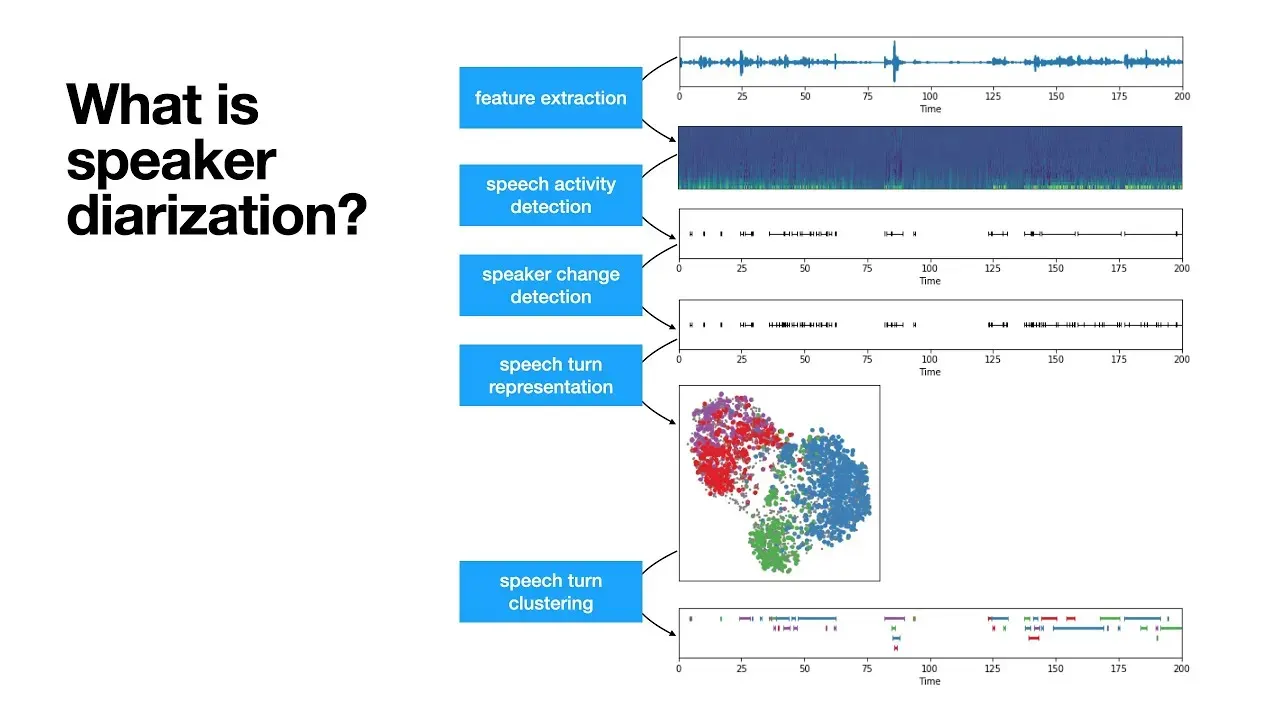
The GitHub description field (API) is: “Neural building blocks for speaker diarization: speech activity detection, speaker change detection, overlapped speech detection, speaker embedding.” Homepage on that repo: https://www.pyannote.ai. Last push in the 2026-10-13 check: 2026-10-07.
How to run (from the official README)
The README section “community-1 open-source speaker diarization” lists four steps:
- Install ffmpeg (needed by
torchcodec). - Install with
uv add pyannote.audio(recommended) orpip install pyannote.audio. - Accept user conditions on the gated Hugging Face card.
- Create a Hugging Face access token.
Python sketch copied from that README (token placeholder unchanged):
import torch
from pyannote.audio import Pipeline
from pyannote.audio.pipelines.utils.hook import ProgressHook

pipeline = Pipeline.from_pretrained(
    "pyannote/speaker-diarization-community-1",
    token="HUGGINGFACE_ACCESS_TOKEN")
pipeline.to(torch.device("cuda"))
with ProgressHook() as hook:
    output = pipeline("audio.wav", hook=hook)
for turn, speaker in output.speaker_diarization:
    print(f"start={turn.start:.1f}s stop={turn.end:.1f}s speaker_{speaker}")
That snippet is documentation, not a forkalt test.
precision-2 in the same README is a premium service (Pipeline.from_pretrained("pyannote/speaker-diarization-precision-2", token="PYANNOTEAI_API_KEY")) that “runs on pyannoteAI servers”. Do not confuse it with community-1.
Benchmarks (upstream, 2025-09)
The README publishes diarization error rate (%, lower is better) last updated 2025-09. Examples copied for identification, not as a ranking against Otter (Otter is not in the table):
| Set | legacy 3.1 | community-1 | precision-2 |
|---|---|---|---|
| AISHELL-4 | 12.2 | 11.7 | 11.4 |
| AMI (IHM) | 18.8 | 17.0 | 12.9 |
| VoxConverse v0.3 | 11.2 | 11.2 | 8.5 |
The README says community-1 “brings significant improvement in terms of speaker counting and assignment” versus the 3.1 legacy pipeline. Self-hosted speed on an NVIDIA H100 80GB HBM3: community-1 31s per hour of audio on AMI IHM (~1h files); precision-2 14s per hour on the same row. forkalt has not reproduced DER or speed.
Optional telemetry (PYANNOTE_METRICS_ENABLED) is documented; the README states they do not track information that could identify the user.
License
- Pipeline card: CC-BY-4.0 (HF API, 2026-10-13).
- Toolkit repo: MIT (GitHub API, 2026-10-13).
Those identifiers are different. Use the license attached to the artifact you ship. Not legal advice.
What we did not invent
- Word-error-rate or meeting-summary quality versus Otter, Descript, or Whisper-based note apps is not sourced here.
- We have not opened the gated card README.
- Hardware other than the README’s H100 speed row is not yet verified.
The rest of that 2025-09 DER table, still upstream:
| Set | legacy 3.1 | community-1 | precision-2 |
|---|---|---|---|
| AliMeeting (ch. 1) | 24.5 | 20.3 | 15.2 |
| AMI (SDM) | 22.7 | 19.9 | 15.6 |
| AVA-AVD | 49.7 | 44.6 | 37.1 |
| CALLHOME part 2 | 28.5 | 26.7 | 16.6 |
| DIHARD 3 full | 21.4 | 20.2 | 14.7 |
| Ego4D (dev.) | 51.2 | 46.8 | 39.0 |
| MSDWild | 25.4 | 22.8 | 17.3 |
| RAMC | 22.2 | 20.8 | 10.5 |
| REPERE phase2 | 7.9 | 8.9 | 7.4 |
On DIHARD 3 (~5 min files) the README also lists community-1 at 37s per hour of audio versus precision-2 at 14s, on the same H100. Lower DER is better; speed is self-hosted on that GPU. Otter.ai does not appear in the table.
HF tags on the card include speaker-diarization, speaker-change-detection, voice-activity-detection, overlapped-speech-detection, and several arXiv ids (2104.03603, 2111.14448, 2012.01477, 2110.07058). Those ids match papers named beside the benchmark rows. We do not summarize the papers here.
See also Video & Audio, Otter.ai alternatives, and models.
Deploy options
FAQ
What is community-1?
The open-source speaker diarization pipeline pyannote/speaker-diarization-community-1 on Hugging Face. The pyannote.audio README (checked 2026-10-13) installs it with Pipeline.from_pretrained(..., token=...) after you accept the gated card. It runs locally once weights are downloaded.
Is this the same as Otter.ai?
No. Otter is a commercial meeting-notes product. community-1 answers “who spoke when” on an audio file. It does not, on the hosts we opened, ship an Otter-class meeting agent, live calendar bot, or summary product. The hub mapping is editorial.
What about precision-2?
The same README documents pyannote/speaker-diarization-precision-2 as a premium pipeline that runs on pyannoteAI servers with an API key. That is not the open community-1 pipeline this page identifies.
What is the license?
Hugging Face lists CC-BY-4.0 on the community-1 card (API, 2026-10-13). GitHub pyannote/pyannote-audio lists MIT for the toolkit. Read both files; not legal advice.
Sources & verification
- https://huggingface.co/pyannote/speaker-diarization-community-1
- https://github.com/pyannote/pyannote-audio
- https://www.pyannote.ai
License notes are not legal advice. Read the original LICENSE. Trademark & disclaimer.